The ad factoryGuide
AI claymation ads: build the clay world once, then reuse it ad after ad
Short answer
Treat an AI claymation ad as a world you build once. Write one character block and one style block, copy them word for word into every prompt, keep the figures silent with one narrator, and cut every shot into a library you reuse. In our ads, the script mattered more than the clay.
The hard part of an AI claymation ad isn’t one good shot. It is the same man, the same house and the same colors in every shot of every ad. Claymation is one of our six formats: we built the clay world once, and every ad since has been cut from it. This guide is what we learned doing that. For the whole chain around any format, read the full AI UGC workflow.
Clay is the look, not the argument
In our own ads we ran the same clay figure in the same style with two different scripts, and the results were far apart. The script under the clay decided more than the clay did. That is why the rest of this guide is about the world and the shots, and why we never treat the material as the idea.
The bible: build the world once
Two blocks go into every prompt, copied word for word and never changed between ads.
| Block | Our example | Rule |
|---|---|---|
| Character block | A clay man in his fifties with a round body, a big nose, messy gray hair, brown trousers and a dark blue sweater | One canonical copy; the same text in every prompt |
| Style block | Handmade plasticine on a warm wooden table, visible fingerprints and tool marks, lumpy imperfect shapes, matte clay, warm light from the upper left, hard cuts, no transitions | Never edited between ads |
Source: our own production rules, October 2026.
Add a set of approved reference images: the man from several angles, the house, the kitchen, the props. Consistency comes from the locked start frame; if your provider also offers a seed, keep it fixed. Name no studio or film in the prompt, only the style words.
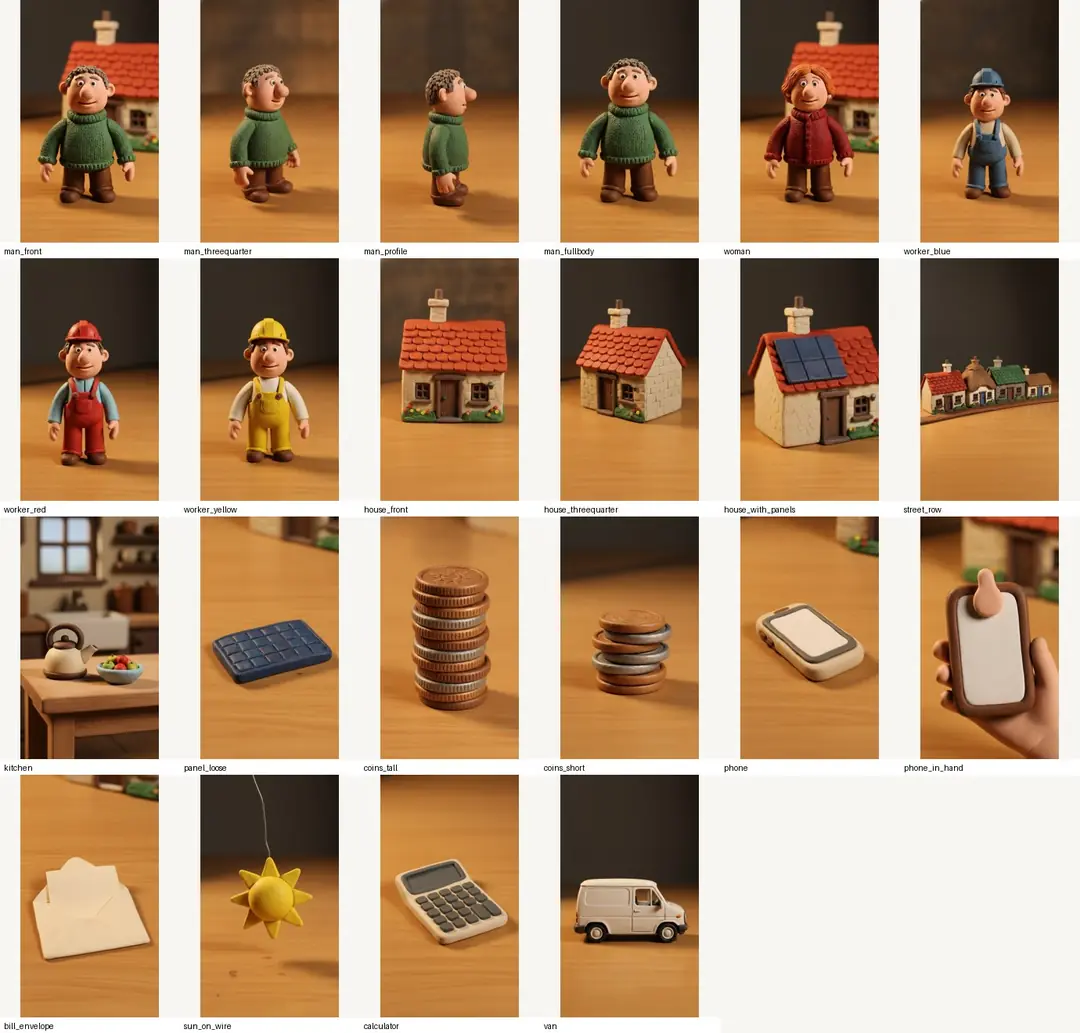
Keep one bible. We once found that a sweater color differed between the original character sheet and the clip library, and the first ad run changed sweaters halfway through. We fixed the clip in one place only, so the sheet and the library still disagree. The lesson: keep a single canonical bible, and update everything else from it.
Shots that hold up
In our own production, in autumn 2026, Seedance generated the clay shots. These are the rules that survived our tests.
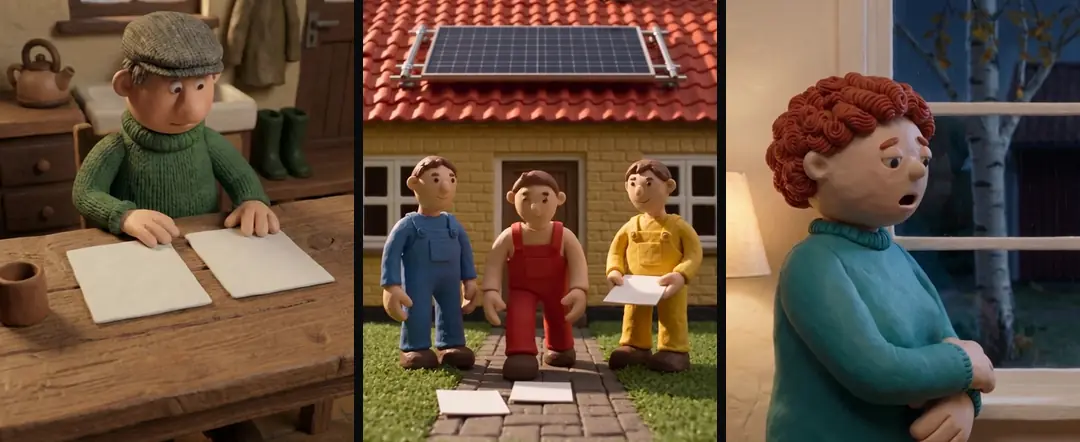
- Hands. Close-ups of fine hand actions, such as writing, counting coins or a handshake, made fingers morph. In the clay world hands came out photoreal and oversized whatever we prompted. We use small clay workers on ladders instead of hands in close-up, keep hand action to one safe beat, and cut away when it turns odd.
- Blank paper. Generated text on paper and screens came out as gibberish. We turn paper into an object with a property:
every sheet of paper in this shot is completely blank, and if anything looks like text, it is wrong. We kept the pen in the scene and added that it never touches the paper. - One word at most. In our tests the model could spell a single word correctly if the prompt spelled it letter by letter and said it was the only text in the shot. Numbers and signs are burned on afterwards, on a locked camera, as an overlay warped to fit the sign.
- Eyes off the camera. A call-to-action shot with the figure at a laptop often looked into the lens. We write
eyes stay on the laptop screen, never looks at the camerainto the prompt and bow the head in the start image. - Precise materials. In our tests an image model matched a solar panel to the roof around it and returned a blue roof tile. Write the material, such as corrugated steel or all-black panels, and say what the object is not.
- No long holds. A shot that holds too long is technically fine and tiring on the contact sheet. We generate a second angle of the same scene and split the hold into two shorter shots.
Silent figures, one narrator
Our clay figures never speak. One narrator, from our own voice pipeline, talks over silent clips that were generated without audio. That travels across languages, because there is no mouth to match, and a small figure tolerates dubbing because its mouth is not visible. The same calm, grounded tone runs through all our worlds, with no villain.
One dated note. In our tests in September 2026, Seedance spoke convincing English, but we did not get usable Danish or Swedish lip-sync, so for those markets we used silent clips and our own voice. That note may describe a different version than the one the maker documents today. Its Seedance 2.5 post, dated 31 July 2026, lists up to ten audio clips as references per generation (checked October 2026). Read the current docs, and test your own language, before you rely on our note. The Seedance 2.0 page lists audio among its inputs too.
Captions and sound
Captions in the clay style are lowercase and heavy. Key words and numbers sit in red boxes, about three quarters of the way down the frame, and everything stays inside the 4:5 zone.
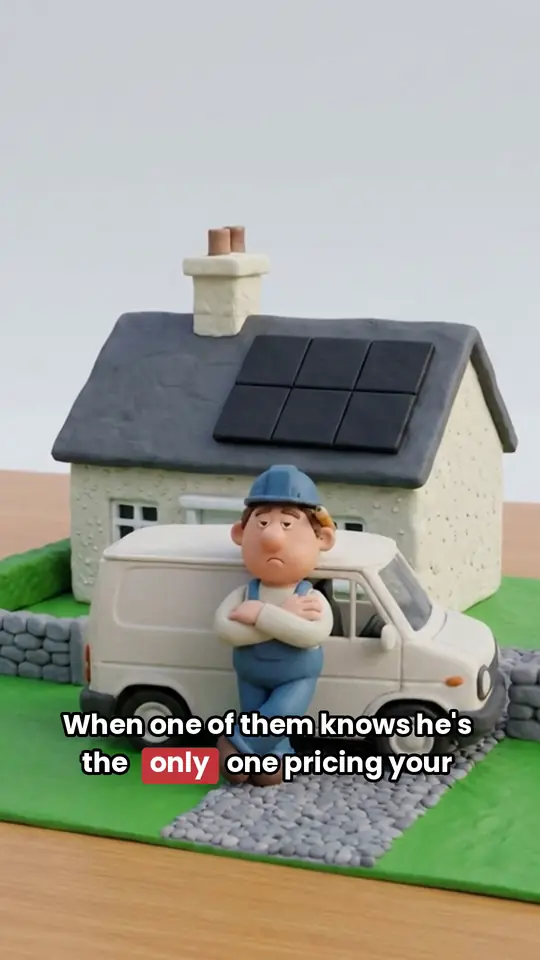
- 1The 4:5 area
- 2Captions: lowercase, heavy, key words in red boxes
Sound effects are keyed to the shot, not the ad: the same effect plays every time the same clip appears. Three rules keep them out of the way. Keep them dry and close, with no reverb or music inside the effect. Make them an accent, not a blanket, landing on the cut and fading. And keep voices out of the effects. They sit well below the narrator.
One library, ad after ad
Build from the library first. We built a set of Swedish ads from the Danish clip library without generating a single new clip. Every generation run is cut at its real scene boundaries, scaled to 1080×1920, saved without sound and indexed with one line. At least half the beats in a new ad should show the product itself, with coins and paper carrying a third at most and never two in a row. Props like coins, screens and maps are product-neutral by design, so one library can carry more than one product.
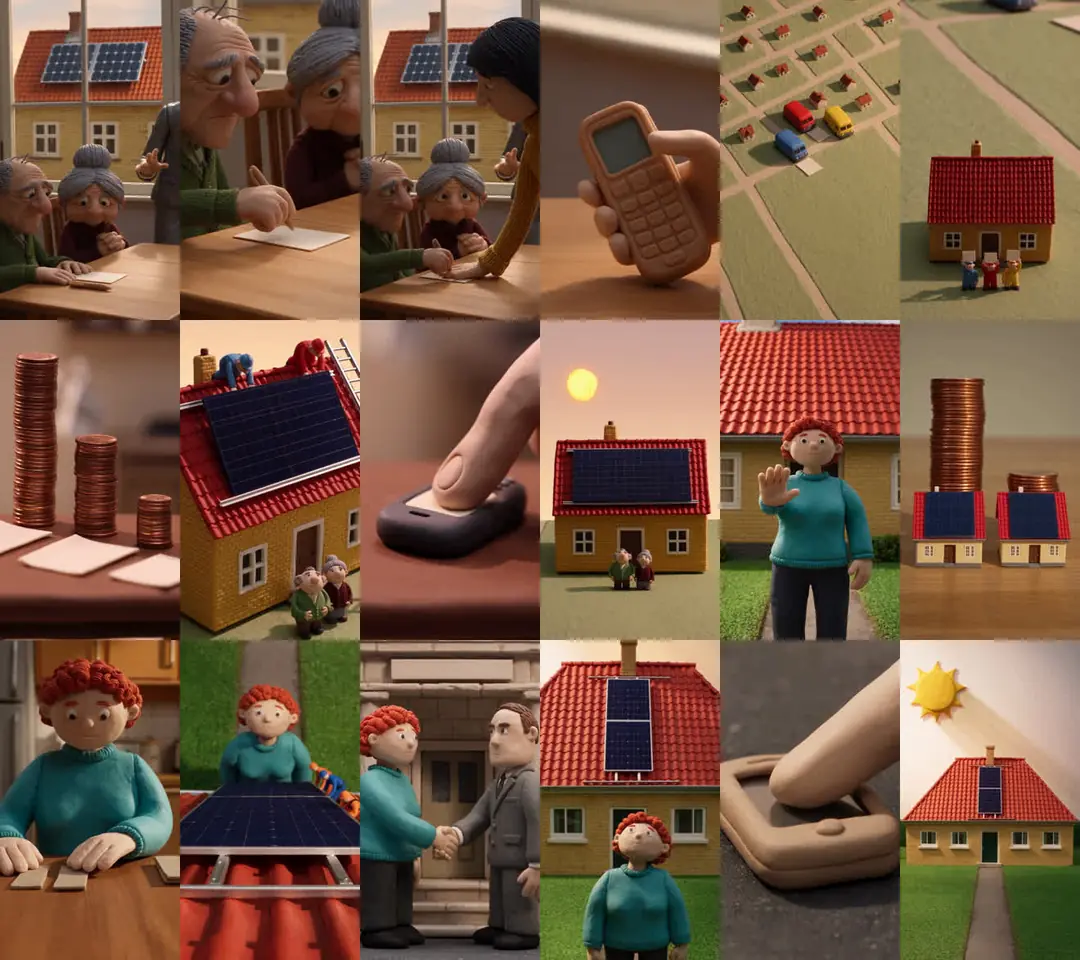
Rotation is its own topic, covered in A b-roll library for ads. The same method runs our skeleton ads.
Your own clay world
The two blocks above are what Brand world bible Coming will hold for your brand: one character and style, locked and reused. Early access: we set it up with you. Coming: we’re building it. Make what’s missing Early access is the other half: new concepts, scripts and clips, library first, so you only generate the beats you do not have. Prompt rules for the video model itself are in How to use Seedance for ads.
Who wrote this We made the ads first, for SmartSolar in Denmark, Sweden and Ireland. Then we built Turntake. Where Turntake comes from
FAQ
How do I make an AI claymation video?
Build the world first: one character block and one style block, copied word for word into every prompt, plus approved reference images. Generate each shot from a start frame, keep the figures silent, add a narrator, and put captions and numbers on in the edit. Then save every shot to a library for the next ad.
Can clay characters talk?
In our ads they do not. Our clay figures stay silent, never look into the camera, and one narrator speaks over the shots. A small figure in the frame also tolerates dubbing, because its mouth is not visible. Check the maker’s current docs before you plan lip-sync into a language nobody on your team can review.
Why do hands look wrong in AI claymation?
In our tests, close-ups of fine hand actions made fingers morph, and in the clay world the hands came out photoreal and oversized whatever we prompted. We now use small clay workers at a distance instead of hands in close-up, keep hand action to one safe beat, and cut away when it turns odd.
How do I keep the clay style the same across ads?
Keep one canonical bible with the character block, the style block and the approved reference images, and copy it unchanged into every prompt. Consistency comes from the locked start frame; if your provider also offers a seed, keep it fixed. When you fix a detail, fix it once in the bible, then check that every ad still matches it.
Can I name a studio’s style in my prompt?
We never do. Our prompts describe the look in plain words instead: handmade plasticine, visible fingerprints, lumpy shapes, matte clay, warm light from one side. Plain words can be copied unchanged from ad to ad, and they keep the prompt about your own world.
Sources
- ByteDance Seed: Seedance 2.0 checked 10 October 2026
- ByteDance Seed: Introducing Seedance 2.5 checked 10 October 2026
Model facts come from each maker’s own documentation, checked on the date shown. Models change, so read the source again before you plan a batch.