The ad factoryGuide
Music and sound effects for short video ads
Short answer
Use sound effects to mark visible actions or meaningful cuts, rather than filling every gap. Keep speech intelligible, choose a music bed that supports the structure, and audition effects in the final mix on a phone speaker. A louder or denser soundtrack is not evidence that the explanation is clearer.
An accent lands on the same syllable the viewer needs to hear. Build sound around the approved voice and picture so each event has a purpose, then audition the layers together. Keep effects, music, and speech adjustable, and review the opening, dense phrases, and close before accepting the finished mix.
List sounds by their visible motivation
Mark the action that might justify a sound: a lid closes, a card changes, or a product lands on a surface. Some cuts need no accent. The list should identify the event and the purpose, not merely assign a different effect to each timestamp.
In our production in October 2026, effects are associated with source shots so the same clip keeps the same sound identity when reused. That practice helps continuity across edits. It does not mean every reused shot must always include the effect; the current voice and scene context still decide whether it belongs.
Keep effects as accents
In our production in October 2026, effects are dry, brief, and well below the voice. They land on a change and fade rather than forming a continuous layer. They contain no extra speech that might compete with the approved narrator.
A short tick can mark a graphic reveal. A long sweep may mask the first word of the next sentence. Listen at the exact join rather than evaluating an effect by itself in the library. The effect’s quality is its usefulness in that moment, not how impressive it sounds alone through headphones.
| Event | Suggested sound decision |
|---|---|
| Real object contact | Use a restrained relevant accent if useful |
| Graphic reveal | Support the change without masking the next word |
| Dense spoken line | Leave room for comprehension |
| Final action card | Keep the ending clear and intentional |
Source: suggested production checklist, October 2026.
Establish the voice as the reference
Listen to the approved voice alone and identify its least clear words. Add effects around those words cautiously. If the sentence is difficult before mixing, revise the recording or wording first.
A sound can change the apparent meaning of the picture. An exaggerated click may imply that a mechanism locks; a sparkling flourish may suggest a transformation. Keep effects within what the scene supports. For a hypothetical container ad, the actual closing action should be visible before a closing accent reinforces it. Sound should not manufacture proof of a product behavior.
In a hypothetical bag ad, a buckle accent has a specific job: connect the audible event to visible contact. It should not compete with the word naming the action. Keep the effect separate from voice and music so its timing and level remain adjustable, then listen to all three together around the fastening interval. A pleasing effect in isolation does not establish a useful finished mix, and the ending still needs its own review.
Choose a bed with room for accents
A busy music arrangement leaves less space for effects and speech. Choose a restrained bed when the explanation is dense. The bed’s opening, middle, and ending should fit the cut rather than compete with its major turns.
Our production in October 2026 requests steady instrumental beds and reviews the ending deliberately after generated music sometimes faded early. That observation is specific to our work. Talking-object ads: give the product a clear role covers a creative format in which an object speaks; if used, its voice needs the same protected space as any other narrator. Do not let effects become a second, louder performance.
Align sounds to the actual picture
Place the effect on the visible event, then play the join. A sound timed to the beginning of a source clip may move away from the action after the clip is trimmed or retimed. Keep effect position relative to the meaningful action where the recipe supports that relationship.

Check several frames around contact and listen at normal playback speed. A small delay can make a physical action feel disconnected. Do not keep nudging until the waveform looks visually aligned; the final picture and audible transient are the references. Record a manual offset if it is part of the accepted timing.
- 01Mark motivated eventsActions and meaningful changes
- 02Protect the voiceCheck dense words first
- 03Place and shape accentsReview the actual join
- 04Audition the final mixInclude a phone speaker
Audition the phone-speaker mix
Play the rendered version on a small speaker as well as headphones. Quiet low tones may be hard to hear there, while sharp transients can become disproportionately prominent. A numerical level difference is useful information, but it does not settle comprehension.
Listen to the first sentence, the densest sentence, and the close. Keep the playback level reasonable and consistent while comparing revisions. If the effect hides a word, shorten or reshape it before raising the whole voice track. The goal is a balanced sequence in the actual listening context, not the loudest possible effect.
- Isolated effect auditionShows the sound’s characterFinal-mix auditionShows whether speech remains clear
- Isolated effect auditionIgnores the neighboring cutFinal-mix auditionChecks timing against the visible event
- Isolated effect auditionCan favor a dramatic effectFinal-mix auditionCan favor a quieter or shorter accent
Check silence as an editorial choice
A pause without an effect can give the viewer space to understand the product. Do not assume every gap in speech is an error. If the picture carries an important demonstration, leave room for its own sound or for a quiet beat.
UGC ad editing: the cut grammar we use covers editing grammar, where cuts and shot relationships already provide rhythm. Sound should reinforce that rhythm selectively. A continuous sequence of swooshes can make different ideas feel equally emphasized. Remove effects one at a time and compare whether the explanation becomes easier to follow before adding more layers.
Preserve stems and placement notes
Keep voice, music, and effects separate, with source IDs, selected intervals, levels, fades, and placement. Hand an AI ad to an editor: what the folder needs covers the full editor handoff. A flattened mix is useful for approval but insufficient for a later change to one effect or one line.
ai ugc ads workflow provides the wider workflow, and Turntake’s production workflow describes the production approach. Recheck the combined rendered audio after a change to voice or timing. The accepted mix should let the viewer follow the explanation and hear an intentional close, with every effect tied to a visible event or an explicit editorial purpose.
Who wrote this We made the ads first, for SmartSolar in Denmark, Sweden and Ireland. Then we built Turntake. Where Turntake comes from
FAQ
Should every cut have a sound effect?
No. Add an effect when it supports a visible action or meaningful change. Dense speech and important demonstrations may benefit from less sound. Review the effect in the full mix rather than judging it alone in a library.
Why tie effects to source shots?
A stable sound identity can preserve continuity when a shot is reused. Keep the association in the recipe, but still review the current mix. A previously suitable effect may compete with a new narrator or a different neighboring cut.
Do source waveforms show the final mix balance?
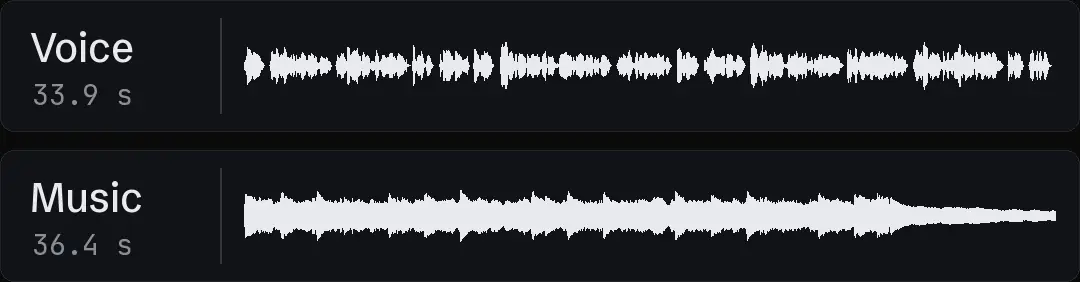
No. Separate source waveforms show timing and where audio ends, not final mixed levels or intelligibility. Listen to the rendered combination. A visible music tail may still be too quiet or too prominent beneath the final sentence.
What should an editor receive for sound?
Provide separate voice, music, and effect sources with intervals, placement, levels, and fades. Include an approved mixed preview. These details let the editor change one event without extracting layers or guessing the timing from a flattened file.